Alula Security
- 4.2
- Rating
- 100.00K
- Installs
- Free
- Price

 Analysis by App-foxy
When I use a home security app, I am not looking for a crowded dashboard or a long list of features I will forget after setup. I want something I can open quickly, understand at a glance, and trust as part of a repeatable routine. Alula Security takes that practical approach by putting smart home automation and security control in one mobile app. It is a free House & Home app from Alula, LLC, aimed at people who already use an Alula-connected setup and want to manage it from an Android phone.
My first impression is that its value depends less on the app in isolation and more on how well it fits the equipment and habits already in the home. It is not a general-purpose smart-home controller that I would install simply to experiment with lights or sensors. Instead, it makes the most sense as the everyday control point for an Alula security arrangement. That distinction matters: the best experience comes from building a small, reliable routine around the app rather than treating it like a novelty.
How I would build a dependable daily routine
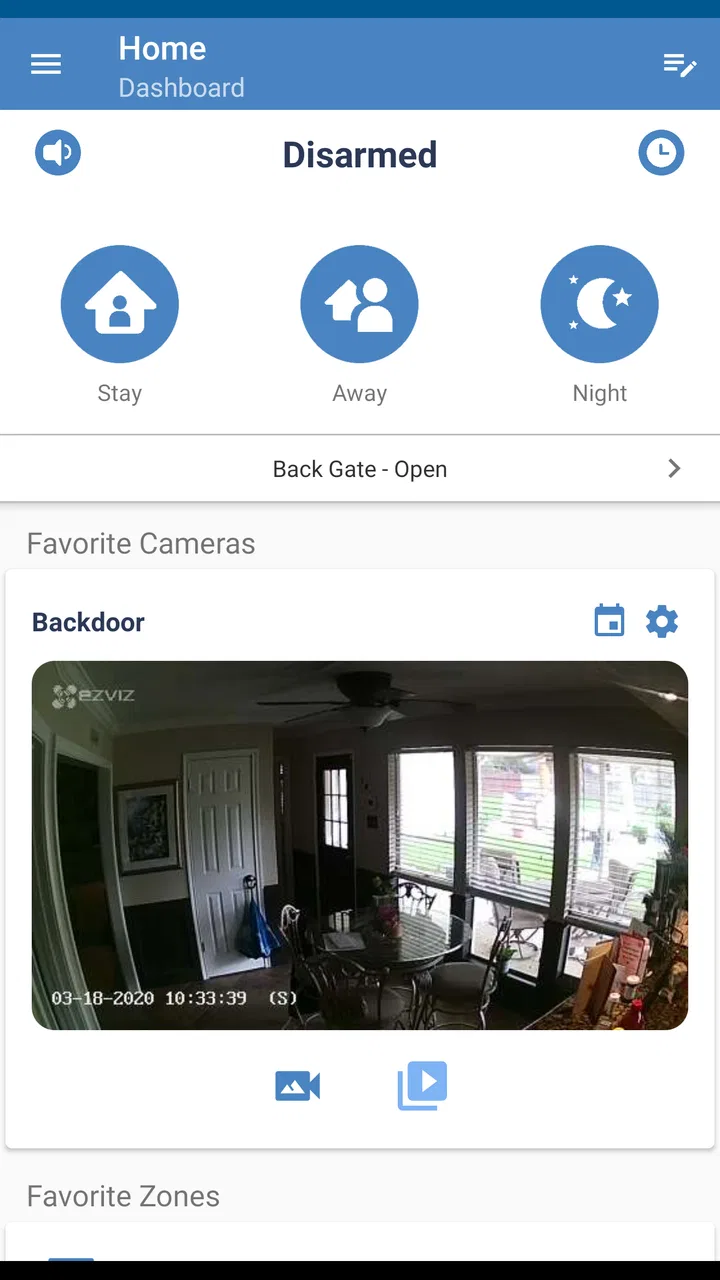
The basic workflow is simple to understand. I open the app when I need to interact with my home security system, check the current state, and use the controls available for my connected setup. The same place can also handle supported home automation tasks, which is useful because I do not have to mentally separate “security” from “home control” every time I leave or return.
You May Also Like

 Blood Strike: 2.5 Anniversary
Blood Strike’s Loadouts Turn Every Drop Into a Tactical Gamble
A close look at Blood Strike’s custom loadouts: how fast access to signature weapons reshapes its battle royale rhythm, rewards preparation, and narrows the gap between fights.

 Pandora - Music & Podcasts
Pandora’s Music Is Easy to Start, but Harder to Recover
Pandora’s strength is its low-effort path from a seed to a station. Its weak spot is how much confidence it asks you to place in connection, setup, and quiet recovery.

 8 Ball Pool
 Is Built on Rivalries, Rematches, and Routine
A close look at the rivalries, rematches, shared routines, and unanswered safety questions that turn a quick pool match into a persistent mobile community.

 Samsung Music
’s Quiet Strength Is Playing What You Already Own
Its reach comes less from spectacle than from dependable access to a personal library. That simplicity is both the app’s strongest retention engine and its ceiling.

 AccuWeather: Weather Radar
AccuWeather Review: A Quick, Clear Forecast for Everyday Decisions
For everyday plans, the best forecast is the one you can understand quickly. AccuWeather makes rain timing, radar, and local conditions easy to act on, with a few trade-offs.

 Hill Climb Racing
Why Hill Climb Racing Still Turns Crashes Into One More Run
A tiny car, a bumpy hill and one more upgrade: Hill Climb Racing keeps resurfacing because its simple chaos makes every near-miss feel personal.
More From Our News Desk



A realistic example is leaving for work in the morning. Instead of walking through the house wondering whether I remembered the system, I can make checking the app part of the final door-locking routine. I look at the status, make the required adjustment, and leave. When I come back, I use the same app-centered habit rather than relying on a different control method. The benefit is not a dramatic technical trick; it is consistency.
I also like the idea of using the app for moments when I am not standing beside the main security panel. If I am upstairs, outside, or already in the car, a phone-based control point is more convenient than returning to a wall-mounted keypad. That convenience is strongest when the action is familiar. If I have to stop and search through menus every time, the mobile advantage becomes much smaller.
For that reason, I would spend the first few days learning the normal path for the actions I use most. I would identify where the system status appears, where the main security controls are located, and how automation controls are presented. Once those actions become muscle memory, the app feels much more useful than a tool I open only when something unusual happens.
The most important habit is checking the state before acting. A quick glance helps prevent the common mistake of assuming the house is in the condition I expect. This is especially useful in homes where several people use the system, because another person may have changed the state after I last checked it. The app becomes a shared reference point rather than just a remote button.
Making the first setup less confusing
I would approach setup with the physical system already understood. Before relying on the phone, I would make sure I know which doors, rooms, or automation devices are represented and what each control is supposed to do. A label that makes sense on a panel may be less obvious on a small screen, so clear naming and a little patience can prevent hesitation later.
I would also test the ordinary routine while I am still at home. That means checking the status, trying the actions I expect to use, and confirming that the result matches what I see in the house. Testing from a safe, familiar position is better than discovering a confusing control when I am already late or standing outside in bad weather.
Another useful habit is to decide who should use the app and for what. One household member might use it for the morning departure, while another mainly checks the home after returning. Agreeing on a shared routine reduces accidental changes and avoids the situation where everyone assumes someone else handled the system.
Settings and choices worth reviewing
Security apps deserve more deliberate settings work than ordinary lifestyle apps. I would review every available option related to alerts, device names, access, and the way the app presents system information. I would not switch on every notification simply because it is available. Too many low-value alerts train me to ignore the phone, which defeats the purpose of having a security app.
A better approach is to separate information I need immediately from information I can check later. Events that affect the current state of the home deserve more attention than routine updates that do not require action. The exact choices will depend on the connected Alula system, but the principle is the same: notifications should support a decision, not merely create noise.
I would also inspect the app after adding or changing a connected device. A new sensor or automation control can alter the way the dashboard feels, and an old label may become misleading. This is one of those small maintenance tasks that experienced users do periodically because it keeps the app understandable for everyone in the household.
There is a practical trade-off between convenience and caution here. Remote control is helpful, but a phone screen can make an important action feel too casual. I would slow down for security changes, read the current status, and avoid tapping through a familiar sequence while distracted. The app can make control faster, but it cannot replace attention.
Android compatibility is another part of the decision. Alula Security requires Android 8.0 or later, so I would check the phone’s operating system before planning to use it on an older device. The app is rated for Everyone, which makes it approachable for a household with different ages, but that does not mean every user should receive every control. Household roles and good judgment still matter.
Shorter patterns for people who use it every day
Once the basic workflow is clear, I would look for repeatable patterns rather than trying to make every interaction clever. For example, I might use one consistent check before leaving, another when arriving home, and a quick status review before going to bed. Repetition reduces the chance that I will forget an important step during a busy day.
I would keep the phone’s access to the app easy without making the whole process careless. A convenient location or familiar launch habit can save time, but I would still protect the phone itself and avoid handing it to someone casually. The best shortcut is one that removes friction from my routine without weakening control over the system.
For a shared home, I would teach the shortest safe workflow instead of explaining every possible option at once. Showing another person how to read the current state and perform the normal action is more useful than giving them a tour of controls they will never touch. This also makes troubleshooting easier, because everyone starts from the same basic understanding.
I find that this kind of app works best when it supports “check, decide, act” rather than “tap and hope.” I check what the system reports, decide whether that matches what I intend to do, and then act. That extra pause is small, but it is a valuable safeguard when security and automation controls sit beside each other.
Another good pattern is to review the app after a change in household routine. A new work schedule, a visiting family member, or a change in which rooms are used can expose confusing labels or unnecessary alerts. The app itself may not need constant attention, but the routine around it should be adjusted when the home changes.
Where the app is strong, and where expectations need adjusting
Alula Security’s main strength is focus. It brings security and supported home automation into one place instead of forcing me to move between a security panel and unrelated controls. For someone already using Alula equipment, that unified approach can make everyday management feel more natural.
It is also a sensible option for users who prefer a dedicated security experience over a broad smart-home platform. General-purpose alternatives may connect to a wider range of brands or offer more elaborate automation ecosystems, but they can also introduce extra layers, separate accounts, and more complicated routines. If my priority is managing an Alula-based home, a focused app may be easier to live with than a larger platform that does many unrelated things.
The limitation is equally clear: the app’s usefulness is tied to the Alula environment. I would not choose it as my first option if my home is built around another security provider or if I want one controller for a wide mixture of brands. In that situation, compatibility and ecosystem breadth matter more than having a clean, dedicated interface.
I would also avoid expecting the app to solve every security problem. A phone interface can show and control a connected system, but it does not replace sensible household procedures, physical checks, or a plan for what to do when an alert appears. The app is part of the workflow, not the entire workflow.
Remote access can create another point of friction. If the phone, account, or connection is unavailable, I would want the household to know the normal alternative for operating the physical system. That is not a criticism unique to this app; it is a basic rule for any home-control tool. Convenience should add an option, not remove all other options.
Practical questions I would answer before installing
The first question is whether it is free to download. Alula Security is free, which removes the initial cost barrier. I would still judge it by compatibility with the existing Alula setup rather than by price alone, because a free app is not useful if it does not match the equipment in the home.
The next question is whether it is suitable for a family device. Its Everyone content rating makes it broadly accessible, and the controls are easier to approach when the household agrees on a small number of standard actions. I would still avoid giving unrestricted access to every person simply because the app is easy to install.
People also want to know whether it is established enough to trust as a daily tool. The app has passed the one-hundred-thousand-install mark and holds a 4.2 average from around three thousand ratings, with roughly five hundred written reviews. Those figures suggest a real user base and generally positive reception, but I would treat them as context rather than proof that every home will have the same experience.
Another practical question is device age. The Android requirement starts at version 8.0, so users with older phones should check that before spending time on setup. On a supported phone, I would still keep the app and the phone’s system software maintained, especially because this is a security-related tool rather than a casual game.
Finally, I would ask whether this is the right choice for someone who wants advanced, brand-neutral automation. My answer is no. I would choose a broader platform for a mixed-brand home, while I would choose Alula Security for a household that values direct control of an Alula security and automation setup over a huge catalog of integrations.
My verdict after using it as a routine tool
Alula Security works best when I treat it as a dependable part of the home’s daily rhythm. Its appeal is not that it turns security into entertainment; it is that it gives Alula users a mobile place to check and manage their connected home without returning to a fixed panel every time.
I would recommend it to someone who already has compatible Alula equipment, wants a free Android control app, and is willing to build a simple check-before-action routine. I would especially recommend it to households where several people need a clear, repeatable way to understand the current state of the home.
I would hesitate to recommend it to someone starting from scratch without Alula hardware, or to an enthusiast looking for a single, brand-neutral automation hub. Those users may be better served by choosing their wider ecosystem first and then selecting its companion app.
For the right home, the real advantage is disciplined simplicity: check the state, use the familiar control path, keep alerts meaningful, and review the setup when the household changes. With that approach, Alula Security feels practical rather than flashy. It is a focused House & Home app from Alula, LLC, released on March 13, 2018, and its strongest case is still the same one I would give a friend: if your security system belongs to the Alula family, this is a sensible mobile companion; if it does not, the app is unlikely to be the reason to change ecosystems.
FAQs for Alula Security
01What is Alula Security and how does it work?
Alula Security is a comprehensive security application designed to protect your home through advanced monitoring and alert systems. It integrates with various smart devices to provide real-time surveillance, remote control, and instant notifications. Users can easily monitor their property from anywhere using their smartphone, ensuring peace of mind.
02Is Alula Security compatible with all smart home devices?
Alula Security supports a wide range of smart home devices, including cameras, sensors, and alarms. However, compatibility may vary depending on the model and manufacturer. It’s recommended to check the official Alula website or app documentation to ensure your devices are supported before installation.
03How easy is it to set up Alula Security?
Setting up Alula Security is designed to be user-friendly, with a straightforward installation process. The app provides step-by-step instructions and intuitive interfaces to guide users through the setup. Even those without technical expertise can typically get the system running in under an hour.
04Does Alula Security offer remote monitoring features?
Yes, Alula Security offers robust remote monitoring features. Through the app, users can access live video feeds, receive instant alerts, and control smart devices from anywhere with an internet connection. This allows for continuous monitoring and quick responses to any security breaches.
05What are the subscription costs associated with Alula Security?
Alula Security offers various subscription plans with different features and pricing tiers. Basic plans may include standard monitoring, while premium options provide enhanced services such as cloud storage and advanced analytics. Users should review the available plans to choose one that best fits their needs and budget.
Pros
- User-friendly interface for easy navigation.
- Real-time alerts keep you informed instantly.
- Customizable settings for personalized security.
- Wide range of supported devices.
- Reliable customer support available 24/7.
Cons
- Subscription required for advanced features.
- Initial setup can be time-consuming.
- Limited offline functionality.
- Occasional notification delays.
- Some features require stable internet.

Alula Security
Gallery